The Ghost in the Machine: Why Your Smart Thermostat Keeps Quitting
You’re sitting on the couch, the house feels like an ice box, and you look at that $300 piece of glass on the wall only to see a spinning wheel of death or a ‘No Wi-Fi’ icon. It’s enough to make a grown man throw a pipe wrench through a window. Most folks think it’s a software bug, but after thirty years of crawling through spider-infested crawlspaces and smelling scorched contactors, I can tell you: it’s usually physics, not pixels. When a smart thermostat drops its connection, it’s often a symptom of a deeper mechanical or electrical failure within your HVAC system, or worse, a setup that was doomed from the start by a ‘Sales Tech’ looking for a commission.
The Sales Tech Scam: A $12,000 Solution for a $2 Wire
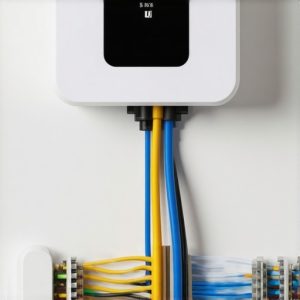
I followed a ‘Smart Home Consultant’ into a house last November. This kid looked like he’d never seen a manifold gauge in his life. The homeowner, a retired schoolteacher, was distraught because her fancy AI-driven HVAC optimization system kept disconnecting, leaving her furnace in a ‘locked’ state. The ‘Consultant’ had already quoted her $12,000 for a full multi-family heating upgrade, claiming her furnace control board was ‘digitally incompatible.’ I watched him try to sell her on a whole new furnace repair and blower motor replacement she didn’t need. I waited for him to leave, pulled the thermostat off the wall, and saw exactly what I expected: four wires. No C-wire. The unit was ‘power stealing’—sucking juice from the R and W terminals to charge its internal battery. Every time the furnace kicked on to satisfy the heat call, the thermostat lost its power priority and dropped the Wi-Fi signal to save its own life. A $20 C-wire transformer fixed it in ten minutes. I told her to keep her twelve grand.
“The most expensive equipment in the world cannot overcome a bad duct system—or an improperly powered control circuit.” – Industry Axiom
The Forensic Diagnosis: Anatomy of a Connectivity Drop
To understand why your thermostat is acting like a moody teenager, we have to look at the Mechanical Anatomy of the system. Your thermostat isn’t just a remote; it’s the brain of a high-voltage beast. In Northern climates, where furnace repair is a way of life, we deal with extreme temperature swings that affect electrical resistance. If your blower motor is failing, it doesn’t just stop; it begins to draw ‘excessive amps.’ This creates a massive electromagnetic field (EMI). I’ve seen blower motor replacement jobs where the old motor was so shot it was throwing off enough ‘noise’ to knock out the 2.4GHz signal of the thermostat sitting three feet away on the other side of the wall. It’s like trying to have a conversation next to a jet engine; the Wi-Fi signal just can’t get through the interference.
The Physics of the ‘C-Wire’ and Power Stealing
Let’s talk Thermodynamic Zooming. Your furnace uses a 24V transformer to handle the logic. When a smart thermostat tries to operate without a common wire (the C-wire), it has to ‘pulse’ the circuit. This pulsing can cause the gas valve or the contactor to ‘chatter.’ In a humid environment, this chatter leads to moisture buildup on the contacts, causing corrosion. If you’re dealing with a mini-split setup, the communication is even more sensitive. These systems use DC voltage to talk between the head unit and the condenser. If your tech didn’t use shielded 14/4 wire, the ‘Sparky’ (electrician) running a high-voltage line next to it will cause communication drops every single time the compressor ramps up. For more on these specific issues, check out mini-split troubleshooting: when and how to call a pro.
The Furnace Cabinet: A Faraday Cage for Your Router
Most people put their Wi-Fi router in the living room, but the furnace is tucked away in a basement or a mechanical closet lined with galvanized tin. If your thermostat is mounted near a ‘Tin Knocker’s’ masterpiece (the ductwork), that metal acts as a shield. In a smart building management scenario, we see this constantly. The ‘Juice’ (refrigerant) might be flowing fine, but if the signal has to penetrate three layers of ductwork and a cast-iron heat exchanger, you’re going to lose the battle. This is where AI-driven HVAC optimization fails—if the AI can’t see the sensor, it defaults to a safety lockout. If you suspect your furnace is the culprit, you might find some answers in furnace repair myths debunked.
Carbon Monoxide and the Safety String
There is a darker side to thermostat drops. Some high-end thermostats are designed to cut their own power if they detect a break in the safety string. If your carbon monoxide detector installation is integrated with your HVAC system, or if your furnace’s high-limit switch is tripping because the heat exchanger is cracked, the system will cut power to the R-terminal. The thermostat goes dark, and the homeowner thinks it’s a ‘connection drop.’ No, that’s the machine trying to tell you it’s dangerous. Always verify the integrity of your heat exchanger before blaming the software. This is why priority service memberships are worth the ‘Pookie’ they’re printed on—a real tech will catch a failing limit switch before it kills your Wi-Fi and your family. Expert tips on this can be found at HVAC repair secrets to boost efficiency.
“All HVAC control systems shall be installed such that the failure of any one component does not result in an unsafe condition.” – ASHRAE Standard 15
The UV Light and Blower Motor Interference
We’ve been doing a lot of UV light installation for HVAC lately to combat mold in the evaporator coils. But here’s the kicker: cheap UV ballasts are notorious for ‘RF leakage.’ I once spent four hours on a roof in a sleet storm because a smart thermostat kept resetting. Turns out, every time the UV light flickered, it sent an electrical spike through the 24V side of the board. We had to move the ballast and install a ferrite choke on the thermostat wires to stop the ‘noise.’ It’s not magic; it’s shielding. Similarly, demand-controlled ventilation systems in multi-family units often have complex wiring that requires a dedicated 24V power supply to ensure the smart thermostat doesn’t lose its ‘gas’ (refrigerant) pressure readings or its cloud connection.
Step-by-Step Fix for Smart Thermostat Drops
1. Check the ‘C-Wire’ Integrity
Pop the thermostat off the base. If you see four wires and a jumper between Rh and Rc, you’re in trouble. You need a dedicated Common wire to provide a constant 24V loop. If you don’t have a spare wire in the wall, buy a ‘Power Extender Kit’ (PEK) or a 24V plug-in transformer.
2. Measure the Static Pressure
If your blower motor replacement was done recently but you used a generic motor, it might be creating high static pressure or electrical interference. Have a tech check the TESP (Total External Static Pressure). High static causes motors to run hot and draw more ‘juice,’ which can mess with the thermostat’s internal sensors.
3. Separate the Frequency
Most HVAC smart tech hates 5GHz Wi-Fi. It’s fast but has zero range and can’t go through walls. Log into your router and create a dedicated 2.4GHz SSID just for your HVAC. This gives the signal the ‘legs’ it needs to reach the basement.
4. Audit the Safety String
If the drops happen only when the furnace is running, check your carbon monoxide detector installation and the furnace’s flame sensor. If the furnace ‘short cycles,’ it can cause the thermostat to lose and regain power rapidly, which looks like a Wi-Fi drop but is actually a power cycle.
At the end of the day, comfort is physics. Your smart thermostat is just a switch with a college degree. If the wires are loose, the motor is screaming, or the ‘Sales Tech’ sold you a bill of goods, no amount of rebooting your router will fix the problem. Treat your HVAC system like the complex thermodynamic engine it is, and it’ll stop making you yell at the wall.